Google brings Gemini assistant to all Pixel Buds: How-to guide and more: Technology news | Tech News
Gemini on Pixel Buds Pro 2
Google is introducing its Gemini AI to all Pixel Buds. In an email to users, Google announced that Gemini will soon be available on Pixel Buds, provided it’s set as the default digital assistant on the user’s Android phone. The rollout has already started, beginning with the new Pixel Buds Pro 2. Additionally, Google has implemented changes to how users interact with assistants via paired earphones.
Gemini on Pixel Buds will be available in regions where the AI is currently supported. However, some Pixel Buds features may operate differently from Google Assistant, although Google has not yet specified the exact changes.
How to Use Gemini on Pixel Buds
-
To use Gemini with Pixel Buds, first ensure that Gemini is set as the assistant on your smartphone, replacing Google Assistant. -
Your Android phone must be unlocked and connected to your Pixel Buds while you are wearing them. -
Once set up, you can access Gemini on your Pixel Buds using the same activation gesture as for Google Assistant.
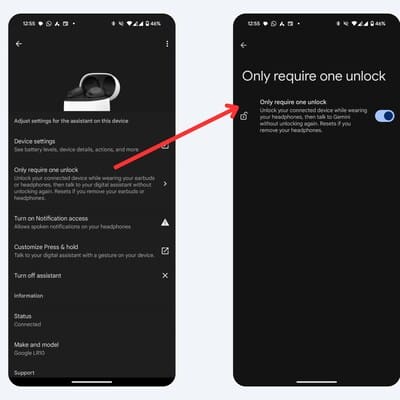
Note that unlocking your phone is only required during the initial setup. Once paired, you don’t need to unlock the phone every time to access Gemini. However, if you remove your Buds or disconnect them, you will not receive personalised responses while the phone is locked. This can be adjusted via the “Only Require One Unlock” option in the Digital Assistant settings for Pixel Buds.
Additionally, the “On headphones” setting under Personal Results does not apply when using Gemini on Pixel Buds.
Changes to the ‘Hey Google’ Setting
Google also announced changes to the “Hey Google” setting for Pixel Buds. This is no longer a separate setting for the Buds. Instead, the “Hey Google and Voice Match” settings on the paired Android phone are automatically synced with the Buds. This update applies to both Google Assistant and Gemini on Pixel Buds.
First Published: Sep 26 2024 | 1:52 PM IST